Total Battle crypt automation bot Google Chrome extension
The Total Battle crypt automation bot is a Google Chrome extension that automates routine crypt exploration from a browser side panel. It repeats the watchtower-to-crypt flow, tracks completed runs, and uses a template-based detector for the game UI.
It is not a cheat or a hack that changes game values; it only automates the watchtower-to-crypt clicks you would make by hand, so think of it as a crypt helper for grinding crypt exploration efficiency while you are away from the keyboard.
How to install
Section titled “How to install”-
Download. Use the button above to get the latest ZIP, then unzip it to a folder you will keep. Chrome loads the extension from that folder, so do not move or delete it afterward. Click here to download the latest Chrome Extension
-
Load it. Open
chrome://extensions(oredge://extensions), enable Developer mode (top-right), click Load unpacked, and select the unzipped folder (the one containingmanifest.json). The extension appears in your list.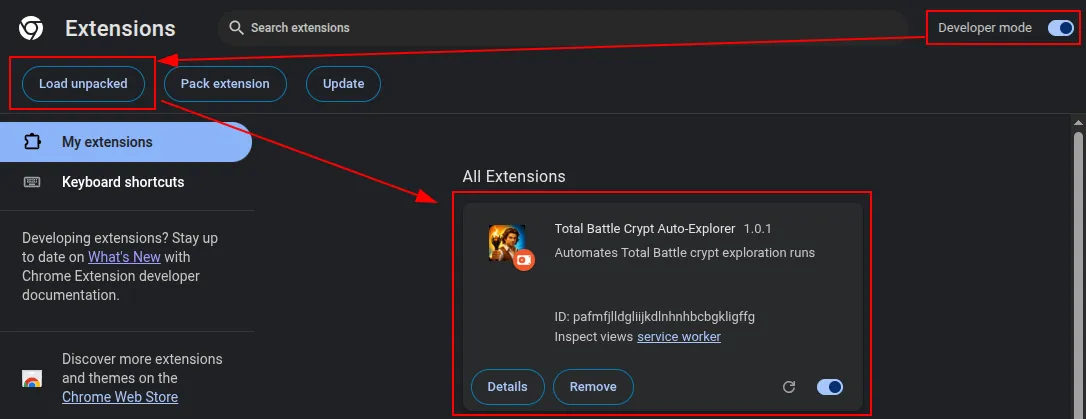
How to start crypting
Section titled “How to start crypting”-
Open the game. Load
https://totalbattle.com, let it fully load, then click the extension’s toolbar icon to open the side panel. Pin it from the toolbar’s puzzle-piece menu so it is always one click away.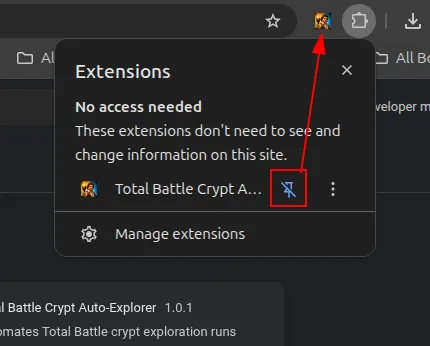
-
Set up in-game. Before a run, confirm that:
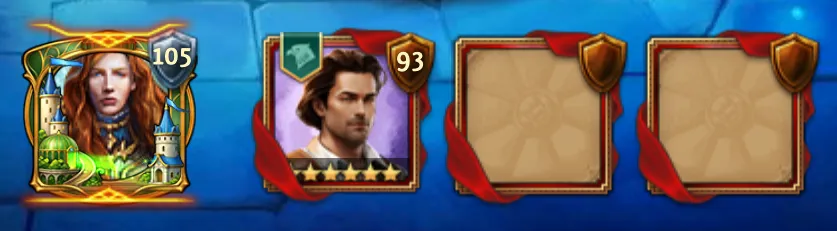
- Carter is the captain in the first march slot. Keep only the captain you want selected for the march.
- Crypting Armor (or your preferred crypt gear) is equipped.
- The Watchtower is reachable and any crypt-list filters you want are already set.
- (Optional, premium) the Great Archaeologist title is active to reduce crypt march time and tar usage.
-
Open the map and clear pop-ups. Switch to the world map and close any shop pop-up that appears, so it cannot block the bot’s first clicks.
-
Configure the run. The defaults under Settings work for most players, so you can usually leave them alone. The bot detects when Carter returns and starts the next crypt automatically. Wait between runs (default
180seconds) is just a safety cap for the rare case that signal is missed. -
Start and stop. Click Start: the execution log shows live progress, the crypts-explored counter updates, and a green pulsing dot means the bot is running. Click Stop to halt immediately.
Can I get banned for using the Total Battle crypt bot?
Automating Total Battle may violate the game’s Terms of Service and can put your account at risk. This kind of automation always carries account risk, even with careful timing and clicking, so you are responsible for how you use it.
Which browsers does the crypt automation bot work in?
It works only in Chrome, Edge, and Brave. You load it as an unpacked extension from chrome://extensions or edge://extensions with Developer mode enabled.
Do I need to configure anything before starting?
The defaults under Settings work for most players, so you can usually leave them alone. In-game you just need Carter in the first march slot with your crypt gear equipped. The bot reads the crypt flow itself and works across game languages, so there is nothing to set up for that.
Related guides
Section titled “Related guides”- Crypts: what crypt exploration is and why it is worth running.
- Daily Checklist: where crypt runs fit into your daily routine.